Your tickets in the terminal, Claude Code one key away.
If you spend your day in the terminal, you keep switching to the browser just to read a notification or book your time. The terminal tool brings the most important parts of Lalabase to the console. You see quickly whether anything is new, such as a bug from a client, write a comment and hand the ticket to Claude Code with one key. When the work is done, you book your time right there.
It grew out of daily work. The founder of Lalabase is a developer too and wanted to stay on the console instead of going back and forth between a web interface and the terminal.
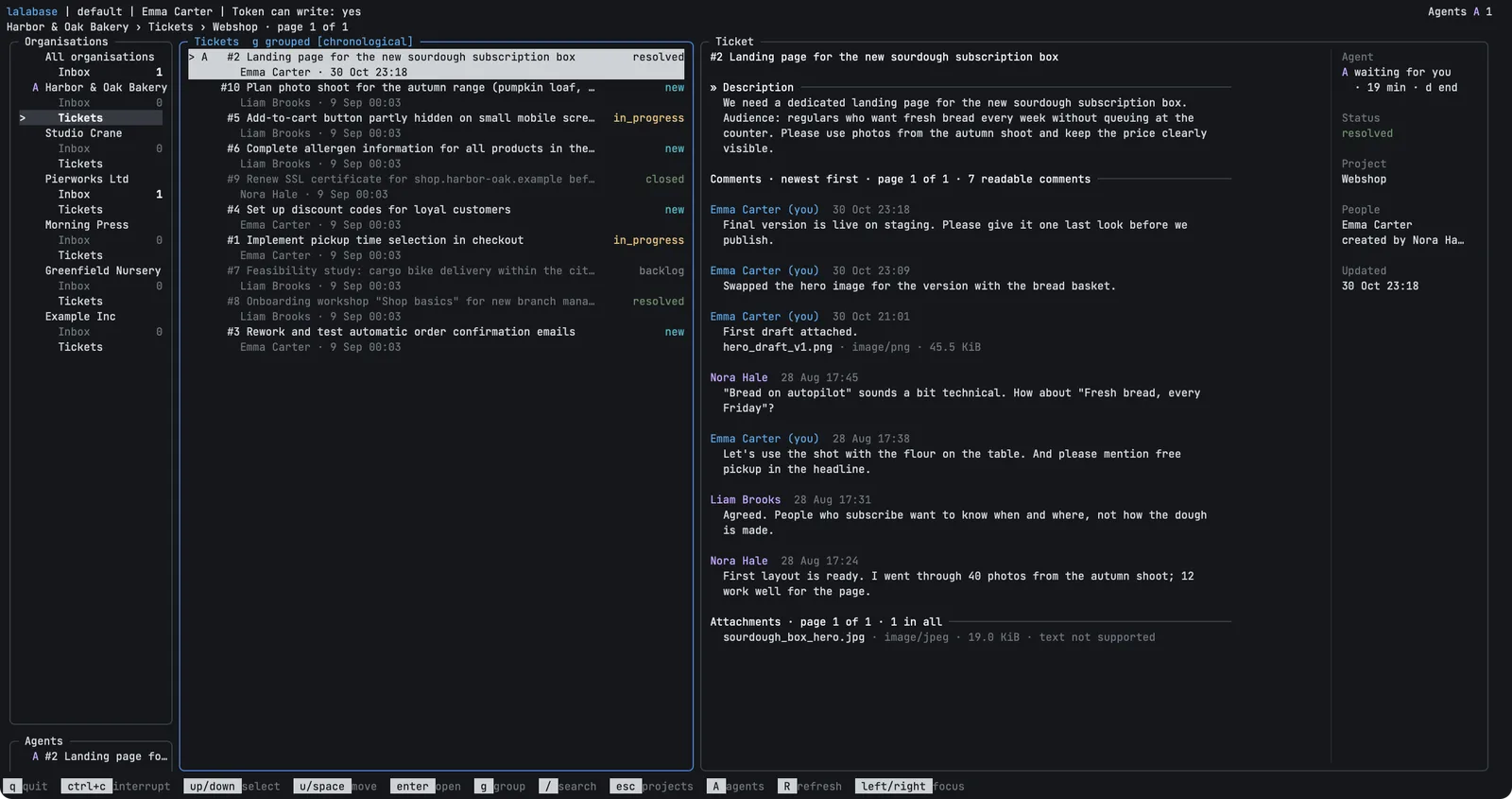
- 01 Inbox: the unread notifications of all your organisations, with counts and one key to mark them as read
- 02 Tickets: lists with search and grouping by status, the ticket with its comments and attachments right beside them
- 03 Answer and book: k writes a comment, b books time on the ticket
- 04 Start an agent: x starts Claude Code with the ticket as its task, in the folder you assigned to the project
- 05 Keep track of agents: In iTerm on macOS you see how many run in parallel, what they are working on, who waits for your approval and who has finished, across all organisations
- 06 Open: open source under MIT, for macOS and Linux
From setup to the booked time

There is no prebuilt release yet. You clone the repository, build the program with Go 1.27 or newer and enter an access token with the server address. If Claude Code already knows your server, lalabase auth import takes both from there. For x you need Claude Code on your PATH, and you enter the folder for each project in the configuration, or the starting folder applies.
A client sends a bug, and you see it in the inbox without opening the browser. The counts date from the start, and the key R fetches the new state. You open the ticket and write your comment.
One x in the ticket hands the bug to Claude Code. In iTerm you see beside it whether the agent is working, waiting for you or finished, and one key takes you back to it. Elsewhere Claude Code takes over the terminal until it ends.
When the work is done, b books your time on the ticket. You change its status in the web app.
What it does not do
The tool is young, and it is a second way into your server, not a replacement for the web app. Ticket management and everything else stay there.
- No ticket management yet. You cannot create tickets or change their status, title or assignee. Comments cannot be edited or deleted.
- Comments are plain text, without uploads. The tool shows no images, a file opens in your browser.
- You book time for today only. Boards, time reports, exports, docs, meetings and the AI assistant stay in the web app.
- No scripting. The tool is interactive, there is no JSON or plain text output yet, and every start needs the server.
- Claude Code only, and no Windows. The tool opens panes of its own only in iTerm on macOS, elsewhere Claude Code takes over the terminal until it ends.
What people ask at this point
- Does it work with the cloud and with self-hosting?
- Yes. You need a Lalabase server, hosted or self-hosted, and an access token you created there. The data stays on the server. The tool uses ticket text from a cache on your machine for up to 24 hours and removes what has expired at the next start. Which keys you get depends on the server and the token, and older servers offer fewer.
- What may the agent do?
- Whatever your token may do, write access included. With x, Claude Code reads the ticket itself, so its text goes to Claude Code. It is asked to treat the ticket as foreign text and to ask before changing it. That is a request, not a boundary. A read-only token or a token limited to individual projects sets a boundary. With a read-only token, though, you can neither comment, book time nor mark notifications as read in the tool yourself.
- How does it differ from the MCP server?
- The MCP server lets an agent reach Lalabase. The terminal tool adds what a person needs around it. It starts the agent on the right ticket in the right folder and shows its state in iTerm.
Look at it
rather than take our word for it.
Productive in under 5 minutes. No sales loop.
Particular data protection or compliance requirements? Talk to us. For cases like that we usually find a way.